
Download Change Clothes AI – AI‑Powered Wardrobe Visualizer & Outfit Planner
Overview
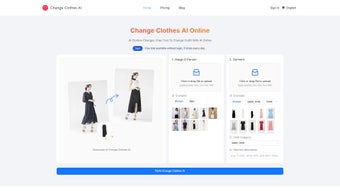
Change Clothes AI is a web‑based application that redefines how you experiment with fashion. By harnessing advanced artificial intelligence, the platform lets you upload a portrait and a picture of any garment—whether it’s a runway dress, a casual tee, or a bold jacket—and instantly generates a realistic image of you wearing the selected piece. Unlike simple overlay tools that merely paste clothing onto a static photo, Change Clothes AI analyses body shape, lighting, fabric texture, and color tones to blend the new attire seamlessly with your original portrait.
This creates a natural look that mirrors a professional photoshoot, allowing you to evaluate fit, style, and color harmony before you buy. The service is especially valuable for online shoppers who want to avoid the uncertainty of size and style, as well as for stylists and influencers seeking rapid visual prototypes. With a free trial that unlocks the core features, users can explore unlimited outfit swaps, experiment with multiple color palettes, and save favorite combinations for future reference.
Because the platform runs entirely in the browser, there’s no need for downloads, installations, or heavy system requirements—just a modern browser and an internet connection. In short, Change Clothes AI combines convenience, realism, and AI‑driven precision to make wardrobe planning a delightful, low‑risk experience. Moreover, the tool continuously learns from each interaction, improving its rendering of diverse fabrics such as silk, denim, leather, and knitwear, which means the more you use it, the smarter it becomes.
Whether you are planning a vacation wardrobe, preparing a photoshoot, or simply curious about how a new blazer would look on you, Change Clothes AI offers a secure, fast, and visually compelling solution that saves time, reduces return rates, and adds a fun, experimental element to everyday style decisions.
Key Features & How It Works
What Makes Change Clothes AI Stand Out
- AI‑Driven Image Synthesis: Deep learning models detect body contours, fabric drape, and lighting to produce lifelike results.
- Instant Outfit Swaps: Upload a portrait and a garment photo, receive a realistic composite in seconds.
- Color & Pattern Exploration: Change the hue of garments or apply pattern overlays without needing new photos.
- Multiple Save Slots: Store up to 20 outfit variations per session for easy comparison.
- Browser‑Only Access: No software download, no registration hurdles—just open the site and start swapping.
- Free Trial & Flexible Plans: Test the core engine for free, then upgrade to a premium subscription for unlimited swaps and higher‑resolution exports.
- Privacy‑First Design: Images are processed on secure servers and automatically deleted after the session ends.
- Batch Processing (Premium): Upload a collection of garments and generate multiple visualizations in one click.
- Cross‑Device Sync: Saved outfits are stored in the cloud, allowing you to resume work on a different device without losing progress.
Step‑by‑Step Workflow
1. Capture Your Portrait: Use a smartphone or webcam to take a clear, well‑lit photo of yourself. The AI works best with a neutral background and minimal accessories, ensuring the system can accurately detect body contours.
2.
Select a Garment Image: Upload a high‑resolution picture of the clothing item you’re interested in. This can be a product photo from an online store, a magazine cut‑out, or a screenshot of a social media post.
3. Adjust Settings (Optional): Choose the desired size, orientation, and any color tweaks.
The interface provides sliders for hue, saturation, and brightness, allowing you to fine‑tune the final look.
4. Generate & Review: Click “Swap” and let the AI render the composite. Within moments, you’ll see a realistic image of yourself wearing the new piece, complete with natural shadows and fabric folds.
5.
Save or Share: Download the result as a PNG or JPEG, or share a secure link directly with friends, stylists, or retailers for feedback.
6. Iterate Quickly: If the first result isn’t perfect, replace the garment photo or tweak the color settings and re‑run the AI. The cloud‑based processing means each iteration takes only a few seconds, even on modest hardware.
The entire process is designed to be intuitive, even for users with limited technical expertise. Because the AI runs on cloud servers, your device’s processing power is never a bottleneck, making the tool equally fast on a modest laptop or a high‑end desktop. Additionally, the platform continuously learns from each interaction, improving its ability to render diverse fabrics—from silky dresses to rugged denim—over time. For power users, the premium plan unlocks batch uploads, allowing fashion retailers to generate hundreds of virtual try‑ons in a single session, dramatically accelerating product photography workflows.
Installation, Usage Instructions & Compatibility
Zero‑Installation, Browser‑Based Experience
Change Clothes AI eliminates the traditional barriers of software deployment. To start, simply navigate to https://changeclothes.ai using any modern web browser—Chrome, Firefox, Safari, Edge, or Opera. The site automatically detects your operating system and loads the appropriate web‑assembly components, ensuring a smooth, responsive experience. Because the application is fully web‑based, you won’t need administrator rights, software licenses, or background services. This makes it an ideal choice for students, remote workers, and anyone who prefers a lightweight solution.
Supported Operating Systems (itemprop="operatingSystem"): Windows 10/11, macOS 11+ (Big Sur and later), Linux distributions with recent browsers, Android 8.0+ (via Chrome or Firefox), and iOS 13+ (via Safari or Chrome). The platform adheres to responsive design principles, so the interface adapts gracefully to tablet screens and mobile phones, allowing you to experiment on‑the‑go.
Step‑by‑Step Usage Guide
- Open the Website: Type the URL into your browser’s address bar. The homepage loads a quick “Start Free Trial” button.
- Create a Temporary Session: No permanent account is required for the trial. Click “Start Now,” and a secure session ID is generated.
- Upload Images: Drag‑and‑drop your portrait and garment photo into the designated zones, or use the “Browse” button.
- Configure Preferences: Choose optional settings such as “Fit Tightness” (loose, regular, tight) and “Lighting Match” (daylight, studio, indoor). You can also enable “Background Blur” to focus attention on the outfit.
- Run the AI: Press “Swap Outfit.” A progress bar shows the rendering stage; the AI typically finishes within 5–10 seconds, depending on your internet speed.
- Review & Save: Examine the output. If satisfied, click “Download” to save a high‑resolution file, or use the “Share Link” feature to send a private URL to friends.
- Upgrade (Optional): If you exceed the free‑trial limits, a pop‑up invites you to upgrade to the premium plan, which removes watermarks, unlocks batch processing, and provides priority support.
The platform also includes a built‑in help center with video tutorials, a knowledge base, and live chat support during business hours. Because all processing occurs on encrypted servers (HTTPS/TLS 1.3), your data remains private and is automatically purged after 24 hours, aligning with GDPR and CCPA standards. For power users, the “Export to Cloud” option lets you store generated images directly in Google Drive or Dropbox, ensuring seamless integration with existing design workflows.
Pros & Cons, Frequently Asked Questions
Pros
- Instant, realistic outfit visualization without the need for physical try‑ons.
- Fully browser‑based; no downloads, installations, or heavy hardware requirements.
- AI adapts to a wide range of fabrics, colors, and lighting conditions.
- Free trial provides ample opportunity to test core functionalities.
- Secure, privacy‑focused processing with automatic data deletion.
- Batch processing and cloud sync for premium users streamline large‑scale workflows.
- Responsive design works equally well on desktops, tablets, and smartphones.
Cons
- High‑resolution exports are limited to premium subscribers.
- Performance depends on internet speed; slow connections may increase rendering time.
- Complex patterns (e.g., intricate embroidery) sometimes require manual tweaking.
- Currently no native mobile app; mobile experience relies on the browser.
- Free trial limits the number of daily swaps for non‑paying users.
FAQ (itemscope itemtype="https://schema.org/FAQPage")
Is Change Clothes AI really free to use?
Yes, the platform offers a free trial that lets you perform up to 10 outfit swaps with standard‑resolution outputs. No credit card is required, and you can continue using the basic features indefinitely. Premium plans are optional and unlock higher‑resolution downloads, batch processing, and priority support.
Do I need to create an account?
For the free trial, an account is not mandatory. The system creates a temporary session ID that expires after 24 hours. If you decide to upgrade, you’ll be prompted to register with an email and password.
What image formats are supported?
Both portrait and garment images can be uploaded as JPEG, PNG, or WebP. For the best AI results, we recommend a minimum resolution of 800 × 800 px for the portrait and 1 200 × 1 200 px for the garment.
Can I use Change Clothes AI for commercial purposes?
Yes, commercial use is permitted under the premium subscription. The license grants you the right to use generated images in marketing, e‑commerce listings, and promotional material, provided you adhere to the platform’s attribution guidelines.
How secure is my data?
All uploads are transmitted over HTTPS with TLS 1.3 encryption. Images are stored only for the duration of the session and are automatically deleted after 24 hours. Change Clothes AI complies with GDPR and CCPA, ensuring that personal data is never sold or shared with third parties.
Conclusion & Call to Action
Change Clothes AI bridges the gap between online shopping uncertainty and the confidence of a physical fitting room. By offering instant, photorealistic outfit visualizations directly in your browser, it empowers users to make smarter fashion decisions, experiment with daring color combos, and reduce the environmental impact of unnecessary returns. The free trial removes any financial risk, allowing you to experience the core AI engine before committing to a premium plan. Whether you’re a casual shopper seeking the perfect summer dress, a fashion influencer curating lookbooks, or a retailer aiming to boost conversion rates, Change Clothes AI provides a secure, user‑friendly, and technologically advanced solution.
Ready to transform your wardrobe planning? Start your free trial now and see how effortlessly you can swap outfits, preview new colors, and shop with confidence. Embrace the future of fashion—launch Change Clothes AI today and let artificial intelligence style you.



.png)



